
GO
Space, or the button. Fires the cue on the right of the bar, then moves on to the next armed one. A disarmed cue is skipped.
Three keys and one bar. This is what they do and what to check before the house opens.
Space, or the button. Fires the cue on the right of the bar, then moves on to the next armed one. A disarmed cue is skipped.
Esc, or the button. Stops everything that is running: sound, waits, sequences, scripts.
Shift + Esc, or the Playback menu. Everything stops with a short fade instead of a hard cut, and anything stuck is released.
Panic has no button on the transport on purpose: it is the one press you do not want a sleeve to find at the wrong moment. It is on the keyboard, in the menu, and it can be fired from the rig — see firing cues from a console.
The bar under the toolbar is the show at a glance. On the left is what is playing: its number, name, the note you wrote on it, elapsed time against what is left, and a progress line. On the right, larger, is what GO will fire next, with its own note. With several cues running it names the one that has been going longest and counts the rest.
The cue list says the same thing in more detail: a playing row counts its Duration cell down, a cue in its pre-wait says so, and a vamping cue says it is vamping.
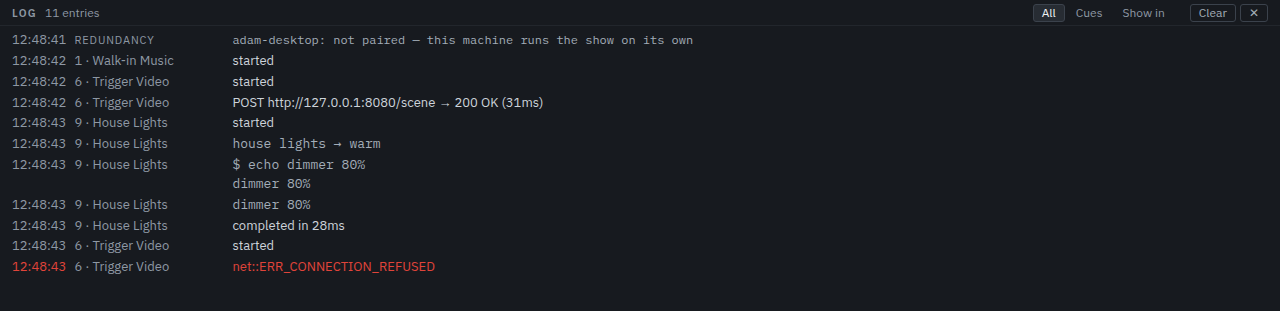
The Log tab in the dock is the session's history: every cue fired, every message sent, and every failure with its reason. It holds the last 500 lines and is not saved with the show. A line that repeats is said once with a count.
An audio event whose type the app does not recognise is named in the log with its count and does nothing else — it never reaches the show. An event of a known type carrying a field the app cannot look up still plays; the log names the field beside it. An engine built against a different set of events is a line you can see rather than a show that quietly does the wrong thing.
If the sound device goes away mid-show — an interface unplugged, a driver that stops calling, another program taking exclusive access — the engine stops playing rather than pouring the show into a device that is no longer there. Every cue it was playing is released at that moment and records audio device lost under Last run, and what happened is on screen in the engine's own words: the monitor's alarm strip, the alarm chip in the transport bar, and the log. The show is not over — the cues it was playing were released, and Settings → Audio is where the engine's own readout says what it made of the device.
When the interface is back — plugged in again, the other program gone, the driver calling again — Reconnect device in Settings → Audio reopens it. The panel sends the settings the show already holds, so nothing has to be changed to make the engine try the device again. A device that is already playing is left alone; when one is reopened, the reading above the control follows there and then — the device is listed, the failure text is gone — and the next GO plays through it. The alarm the loss raised is not the reconnect's to take down: it stands in the alarm strip until it is dismissed there. A reconnect the engine will not honour says so in the engine's own words, and the device that was playing is put back rather than quietly swapped for a lesser one.
A cue that failed also says so in its own inspector, under Last run: when it ran, how long it took, and what went wrong. If a cue "does nothing", that is the first place to look, then the log. Troubleshooting lists the usual causes.