
Building a cue list
A show is a list of cues in the order they happen. This is how to get one from a script to something you can run with one finger.
Adding and ordering
The toolbar adds cues: Audio, Group, Fade, Wait, Stop, and the rest under More. A new cue lands after the selected one. Dragging a row moves it; dropping audio files on the list adds them where you dropped them.
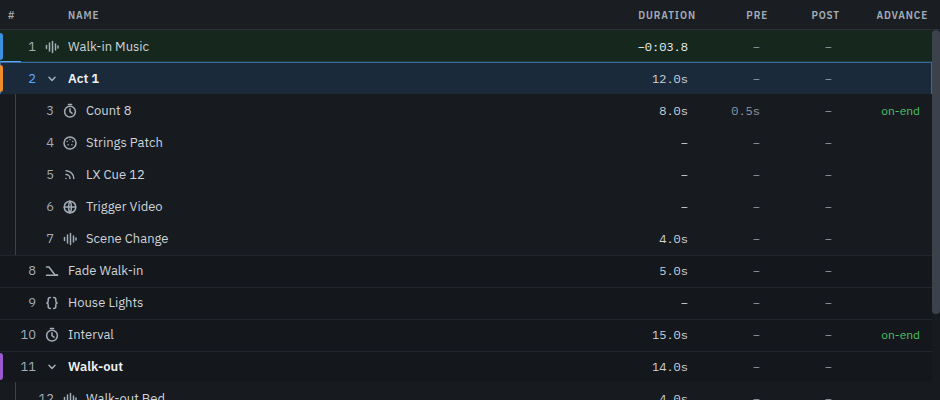
Right-click a row for duplicate, delete, colour, arm and disarm. A disarmed cue stays in the list and is skipped by GO, which is how you take something out of a show without losing it. Undo is Ctrl/⌘ + Z and covers the last 50 edits.
Numbers and names
Numbers are yours: they are text, not positions, so 12.5 and
LX 12 are both fine and inserting a cue renumbers nothing. Names are
what you read at speed — name them for the moment in the show, not the file.
Double-click a row to rename it.
Every cue has notes. The first line appears in the bar at the top when the cue is playing or next, so a note is worth writing: "let it run under the scene change", "wait for the door".
The cue types
Twelve of them, and the reference lists every field of each. In practice:
| Type | What it is for |
|---|---|
| Audio | Play a file. Level, pan, fades, loops, trims and routing. |
| Wait | Hold for a set time. The glue in a sequence. |
| Fade | Ramp another cue's level, and optionally stop it at the end. |
| Stop | Stop one cue, or everything, with or without a fade. |
| Group | Cues inside a cue: fire them in order, all at once, at random, or on a timeline. |
| MIDI / OSC / Network | Send a message to something else in the rig. |
| Show Control | MSC: GO, STOP and LOAD to a desk that speaks it. |
| Script | Run JavaScript, including a system command. |
| ScenePro | Move the sound desk to a scene you built. |
| Devamp | Let a looping cue out of its loop and play on. |
Groups
A group is a cue with cues inside it. GO fires the group, and what happens next is the group's mode:
- Sequence — its children in order, each after the one before.
- All at once — everything together: a bang, a blackout, three sends in one press.
- Random — one child, picked at random. Good for a stinger you do not want to be identical every night.
- Timeline — each child at an offset you set by dragging it. The dock draws the timeline for a group in this mode.
- Playlist — one child per GO. The group holds the show until a full pass is done, so a walk-in playlist of thirty cues is thirty presses.

Stopping a cue inside a group is not the same as stopping the group: the group moves on from it. A sequence steps to the next child, a timeline stops waiting for the one you took away, and a playlist's pass is left where it was, so the next GO fires the child after it.
Open a group with the chevron on its row. A group's duration is worked out from what is inside it.
Timing: pre-wait, post-wait and advance
Three settings on the Basics tab decide how a cue behaves in time.
| Setting | What it does |
|---|---|
| Pre-wait | Waits this long after GO before the cue does anything. |
| Post-wait | Waits this long after the cue finishes before handing over. |
| Advance | Whether the next cue fires by itself: None, On start (as soon as this one starts) or On end (when it finishes). |
On start chains cues that should happen together but stay separate rows. On end is the one to reach for after a wait: a count-in that hands over to the music by itself is a wait with Advance set to On end.
Next
Working with sound goes into audio cues properly. Running the show is the night itself.