
Watching the radio micsPro
Two questions, all night: who is wearing which pack, and which one is about to die.
1. Point it at the rack
Settings → Wireless → Add source. A source is either an HTTP address that returns the readings, or a file on disk that something else keeps up to date. Cuerunner does not speak any receiver's own protocol — it reads one simple JSON document, and anything that can produce it will do. The format is here; it is about ten lines.
Demo is a simulated twelve-pack rack with a pack in trouble, one low and one that never reports. It is there to see what the panel does without a receiver on the bench.
2. Enter the plot
Show Settings → Mic plot is the rig as you know it: pack 4 is channel 4, and channel 4 is whoever is wearing it. The plot is the expectation — it is what makes a pack that never reports an alarm rather than a blank row.
A swap mid-show is a change of who is on which pack, recorded where the report can see it: change the performer on a pack row and the swap is logged with the time.
3. Read it during the show
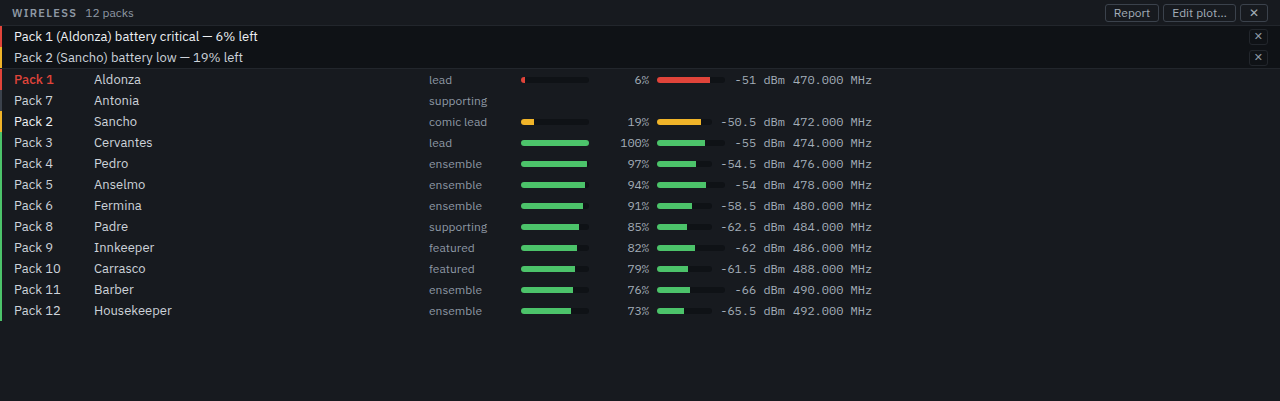
The Wireless tab in the dock sorts by trouble rather than by number: critical battery first, then a pack that has gone quiet, then a low one, with everything healthy below. Each row carries the pack, the performer, battery and RF as bars and numbers, the frequency, and whether the channel is muted.
The wording is exact, because the difference matters at 19:55:
- Unpatched — no channel assigned. A patch waiting to be made, not an alarm.
- Silent — assigned, but has never reported. The rack may still be booting, or the pack is off.
- Offline — reported before, and has now stopped for longer than the threshold. This one raises an alarm.
Alarms appear above the panel and in the transport bar, so a battery warning finds you even with the dock closed. The thresholds — battery low, battery urgent, signal weak, how long silence counts as offline — are in Settings → Wireless.
4. The report
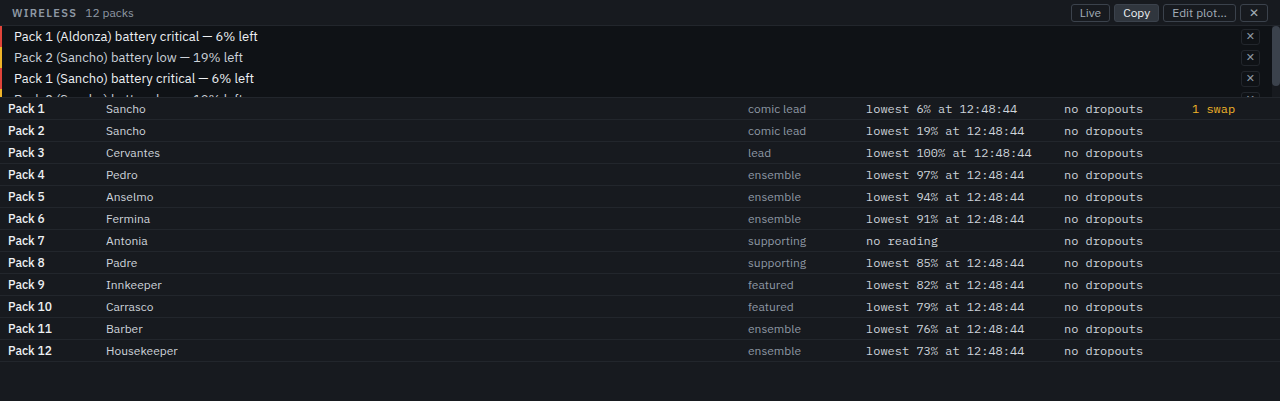
Report switches the panel to what the session recorded: the lowest battery each pack reached, its worst signal, and the swaps that were made. It is the thing to look at after a show that had a dropout, and the thing to hand over when somebody else takes the rig.